To fix one earbud not working, start with the cheap checks: charge both buds in their case, clear lint off the charging contacts, then forget the Bluetooth profile and pair again. Most silent-side faults clear with that sequence. When none of it works, the problem is a dead driver or a failed battery inside the bud, and only a repair or a warranty claim will sort it.
I have walked people through this sequence more times than I can count, and the same three culprits come up again and again: a flat bud that never charges because of a dirty contact, a pairing record that went stale after a phone restart, and a speaker mesh packed with earwax. None of those need a screwdriver.
One quick note on why a single bud can die alone. In true wireless earbuds, each side has its own battery, driver and Bluetooth radio, and one bud usually acts as the master that relays audio to the other. Because the two sides are independent, the right one can lose charge, pairing or sound while the left keeps working perfectly. That independence is also why manufacturers usually sell a replacement bud on its own.
Table of Contents
- What You Need
- Step-by-Step: How to Fix One Earbud Not Working
- 1. Check the affected earbud and charging case
- 2. Charge the earbud completely
- 3. Test the earbud after removing earwax and debris
- 4. Reset the Bluetooth pairing
- 5. Reset the earbuds using the manufacturer’s method
- 6. Check firmware, app settings, and audio output
- 7. Test with another device and arrange repair if needed
- Common Mistakes
- Frequently Asked Questions
- Why is only one of my earbuds working?
- Can I fix one earbud without replacing both?
- How do I reset earbuds when only one side has sound?
- Does cleaning an earbud help if it stopped working?
- When should I contact the manufacturer or a repair service?
- Conclusion
What You Need
You need a short list, and almost nothing on it is special. The point of gathering these first is that it stops you jumping to a factory reset while the real fault is a bent charging pin.
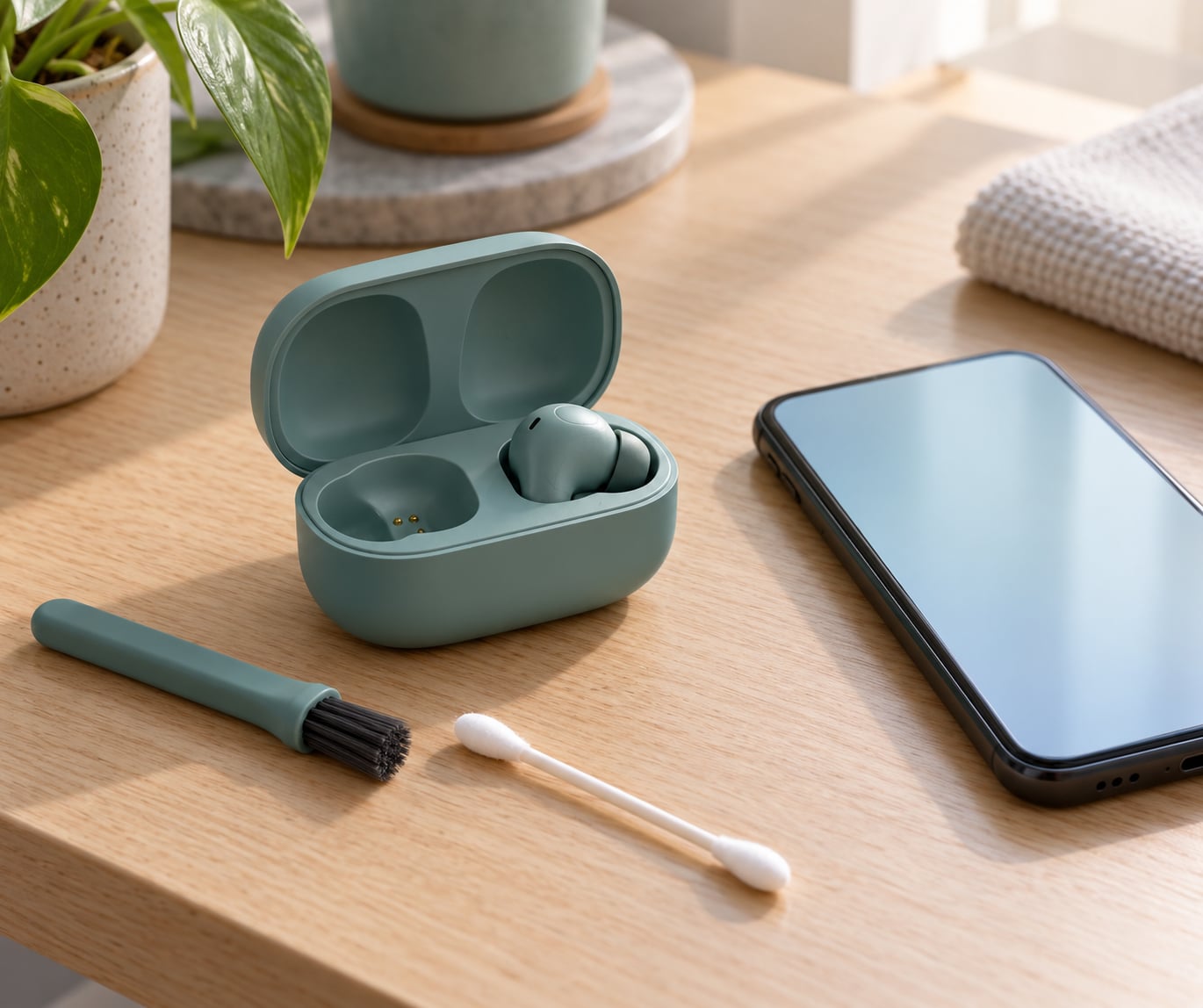
- Both earbuds, plus the charging case they came in
- A USB cable and a wall charger you know works on another device
- A dry, soft-bristled brush or a lint-free cloth
- Your Android phone, and ideally a second device for the isolation test in step 7
- The manual or official support page for your exact earbud model
One caveat before you start. The menu names, the reset gesture and even the meaning of the indicator light differ by earbud brand, by Android version and by phone manufacturer. A Pixel, a Redmi and a Samsung handset put Bluetooth and audio settings in different places. Where a path may vary I have said so rather than pretending there is one universal route.
Step-by-Step: How to Fix One Earbud Not Working
Work through these in order, cheapest and least invasive first. Before you start, match your symptom in the table below, because a bud that never lights up and a bud that lights up but stays silent point to different faults.
| Symptom | Likely cause | Start at |
|---|---|---|
| No light at all when you take the bud out of the case | Flat battery, or a charging contact blocked with lint | Steps 1 and 2 |
| Light comes on, but no sound on that side | Blocked speaker mesh, a failed driver, or the channel is not routed | Steps 3, 5 and 6 |
| One side is noticeably quieter | Wax or debris on the nozzle, or the audio balance is panned | Steps 3 and 6 |
| Crackling, or sound cuts out after a few seconds | Weak link between the buds, or a tired battery | Steps 4, 5 and 7 |
| Only works when pushed hard into your ear | Blocked nozzle or a driver on its way out | Step 3, then warranty |
1. Check the affected earbud and charging case
Start by looking at the bud that is failing, then the case. Hold both under a light and look at the small metal charging contacts on the underside of the bud and the matching pins inside the case.
You are hunting for three things: lint pressed into the contact, a bud that sits loose or tilted in the case, and any physical damage such as a cracked hinge, a scuffed nozzle or a case that has been dropped. Lint in that slot is the single most common cause of the case showing a charging light while one bud stays dead.
Seat the bud the way it was designed to sit, with the contacts aligned to the pins and the stem upright, then close the lid. Most cases show a brief light when a bud is detected. If the case light stays solid green or amber instead of blinking, it may be reporting the case charge rather than the bud charge, so do not treat that as proof the bud is charging.
2. Charge the earbud completely
Put both earbuds in the case, even though only one is misbehaving, and connect the case to a charger you know works. Leave it for a full cycle, which for most cases means 30 to 60 minutes.
Why does this matter so much? A single bud can sit at a few percent while its partner is full, and a partially charged bud will power up, connect and then drop out. Some cases refuse to charge a bud that sits for even a few minutes because the auto-detect circuit times out, so close the lid and walk away rather than leaving the lid open while you clean things.
Then check the honest variables. A frayed cable, a wall adapter that has dropped its output, or a case contact that has gone dull will all produce this exact symptom. Swap the cable, try a different adapter, and watch the case light while it runs.
3. Test the earbud after removing earwax and debris
Cleaning solves more one-sided faults than people expect. Take the bud out, remove the ear tip if it detaches, and look straight into the speaker grille and the microphone port.
Use a dry, soft brush or a dry lint-free cloth and brush gently across the grille. For the charging contacts, a dry cotton swab or the dry brush works well. Then put the bud back in the case and test it.
What not to use matters as much as what to use. No water, no alcohol, no swabs with liquid in them, no pins or paperclips, and no compressed air, which can drive debris deeper into the mesh and permanently pack it. I have also seen people blow into the nozzle, which does the same thing in slow motion.
4. Reset the Bluetooth pairing
Forget the earbuds on your phone and pair them again from scratch. On most Android phones the path is Settings, then Connected devices, then Bluetooth, then the three-dot menu beside your earbuds, then Unpair. On other builds it is Settings, Apps, then the app named Bluetooth, then Forget.
Switch Bluetooth off for about ten seconds and back on again first, because a stale profile is often all that is wrong. If your phone runs a recent Android version, the exact labels vary by manufacturer, so look for Unpair, Forget or Disconnect rather than expecting one fixed word.
You know it worked when the earbuds appear as a single paired entry again and both sides produce sound. If the phone lists two separate entries after pairing, that is a pairing failure and you should go straight to step 5.
5. Reset the earbuds using the manufacturer’s method
A factory reset drops the pairing history from both buds so they can start fresh, which clears a corrupted link between the master and the slave side. Every guide says to do this and almost none say how to tell whether it worked. Here is what a successful reset actually looks like.
Put both buds in the case with the lid open, then hold both touch panels or reset buttons. Keep holding through the first flash. When the indicator flashes red a few times or the buds power off in the case, the reset is done. Release, close the lid for ten seconds, reopen and pair as new.
One bud flashing while the other stays dark during this procedure is normal on many models, and users on support forums regularly assume it means the reset failed. It does not, as long as the silent bud is inside the case while you hold.
Reset gestures vary by family, so check the row that matches your buds and then confirm against your model’s support page, because firmware revisions do change these details.
| Brand | Reset gesture | Hold | Light pattern |
|---|---|---|---|
| Xiaomi and Redmi | Both buds in the open case, hold both touch panels | About 15 to 20 seconds | Flashes red three times, then the case pulses |
| Samsung Galaxy Buds | Both buds in the case, hold both touch panels, or tap the silent bud twice first | About 10 to 15 seconds | Flashes red once, both buds then power off |
| Apple AirPods | Both buds in the case, lid open, hold the setup button on the back | About 10 seconds, then keep holding past the first flash to about 35 seconds | Amber then white light inside the case |
| Jabra | Hold the button on the case until the LED flashes | About 3 seconds on some models, longer on others | White flash on the case LED |
| OnePlus and boAt | Both buds in the case, hold both touch panels or the case button | 10 to 20 seconds | Flashes red or amber, then off |
| Noise | Long-press the touch panel on both buds out of the case | About 6 seconds | Three quick flashes, then off |
Note that some Redmi models, including the Redmi Buds 5, have no physical reset button at all. On those you reset through the case gesture or through the companion app, which is why a forum question about a Redmi Buds 5 reset button going dead usually means the button was never there.
6. Check firmware, app settings, and audio output
If both buds are paired and one is still silent, the fault has moved into software. Four things to check, in this order.
- Restart the phone. A restart clears the Bluetooth service and the audio stack. It sounds obvious and it is still one of the more effective fixes.
- Update the earbud firmware. Open the companion app your buds use, such as the Xiaomi earbuds app, Galaxy Wearable or Jabra Sound, and check for a firmware update. A bad update can leave one channel unrouted.
- Confirm the audio output. While your earbuds are connected, pull down the quick settings panel and check that the media output is actually the earbuds and not the phone speaker or a leftover car system.
- Check audio balance and mono output. On Android, look under Settings, then Accessibility, then Audio balance and slide it to the centre. Then check that mono audio output is off, because mono mode should play both channels in both ears and some builds still drop a side.
The audio balance slider is the setting people forget most. If it got dragged to one end by a stray tap in a pocket, one side goes completely silent while the other sounds normal, and nothing in the earbuds themselves is wrong.
7. Test with another device and arrange repair if needed
Pair the earbuds with a second Android phone, a tablet or a computer. This one test tells you where the fault lives.
- Sound works on the second device: the problem is your phone’s Bluetooth profile or audio settings. Go back to steps 4 and 6.
- The same side is silent on the second device: the fault is in the earbud itself, not the phone.
If the dead side stays dead everywhere, you have a hardware fault. That means a driver that has failed, a battery that will not hold charge or a broken contact inside the bud, and none of that is fixable at home.
Before you pay for anything, check the warranty. Most brands sell and replace a single earbud, not the full pair, and Xiaomi and Redmi service centres handle single-bud claims. Get the serial number from the case, take photos of the fault, and ask directly about single-bud replacement. The longer you keep a half-working pair in rotation, the more the good side is being run to compensate, and one user on r/Earbuds watched a working left bud give up a year after the right one died.
Common Mistakes
Almost every failed attempt I see follows one of these patterns.
- Charging only the working earbud. The whole point of the case is that both buds charge together, and a reset needs both present. Always put both in.
- Resetting the wrong device. A factory reset clears the earbuds, not the phone. You still need to forget the Bluetooth profile on the phone afterwards, or the old record comes straight back.
- Skipping the forget step. Re-pairing without unpairing first often reuses the broken record. Forgetting the device is a separate action from switching Bluetooth off.
- Using a damaged cable. A cable that only charges one phone, or charges slowly, will happily leave one bud flat forever. Try a different cable before you conclude the case is faulty.
- Cleaning with liquid. Alcohol, water and even a damp swab can get into the mesh and residue attracts more debris. Dry only.
- Treating rice as a fix. Rice does nothing for a dead driver. It only gives you a case full of starch to clean out later, and one Reddit owner reported leaving a dead bud in rice for a day and a half with no change.
- Assuming one earbud can be repaired on its own. Drivers and tiny batteries are potted inside the bud. Opening one voids the warranty and rarely works. A single replacement bud from the manufacturer is the realistic repair.
One habit worth keeping: test after every single step, not just at the end. Seven changes in a row with no testing in between is how people end up resetting good earbuds and never knowing which fix actually did it.
Frequently Asked Questions
Why is only one of my earbuds working?
Usually the silent bud has lost charge, lost its pairing link, or has a speaker mesh blocked with wax and lint. A failing driver or a flat battery that will not hold charge are the other two common causes. Because each bud runs its own battery and Bluetooth radio, one side can fail while the other keeps working. Charging both buds, cleaning the mesh and re-pairing fixes the first three causes; a dead driver needs a replacement bud.
Can I fix one earbud without replacing both?
Yes, if the cause is dirt, a drained battery, a stale pairing record or an audio balance setting pushed to one side. All four are free to fix and take under ten minutes. If the bud stays silent on a second phone after a factory reset, the driver or the internal battery has failed, and no home fix will help. Most brands then replace a single bud rather than the whole pair, so check your warranty before buying anything new.
How do I reset earbuds when only one side has sound?
Put both buds in the case with the lid open, then hold both touch panels or the case button until the indicator flashes red a few times and the buds power off. It is normal for only one bud to flash during the procedure, as long as the silent one is sitting in the case. Then close the lid for ten seconds, forget the earbuds in your phone Bluetooth settings and pair them again from scratch.
Does cleaning an earbud help if it stopped working?
It often does, and it is the first thing to try. Wax and fine debris pack the speaker grille and the sound port, which muffles one side and can stop it entirely. A bud that only works when pressed hard into the ear, a complaint Jabra Elite 4 owners raise often, is usually this rather than a dead driver. Use a dry soft brush and a dry cloth only, and avoid alcohol, water, metal tools and compressed air.
When should I contact the manufacturer or a repair service?
Contact them once the bud stays silent on a second device after a full charge, a clean and a factory reset. That combination rules out the software and pairing causes and points to a driver or battery failure inside the bud. Act sooner if the earbuds are still under warranty, because claims are far easier within the coverage period. Have the serial number, purchase proof and photos of the fault ready, and ask specifically about single-bud replacement.
Conclusion
Start with the two-minute version: seat both buds in the case, charge the case with a cable you trust, brush the grille and the charging contacts dry, then forget the Bluetooth profile and pair again. That sequence alone resolves most one-sided faults, and it costs nothing.
If the bud is still silent after that, do the second-device test. Silence everywhere means a hardware fault, so contact the manufacturer while the warranty is live and ask about a single-bud replacement rather than paying for a whole new pair.