Connecting a soundbar with HDMI ARC takes about five minutes and one cable. Plug a high-speed HDMI cable into the port on your television marked ARC or eARC and into the soundbar’s HDMI port, turn on the HDMI-CEC feature on the TV, then switch the TV’s audio output from TV Speaker to HDMI ARC. That is the whole process, and the rest of this guide explains each part, including what to do when it does not work.
The fiddly bit is rarely the cable. It is finding the right port, and remembering that most TVs will not hand sound over until you tell them to.
Table of Contents
- What You Need
- What the abbreviations actually mean
- Step-by-Step: How to Connect a Soundbar with HDMI ARC
- 1. Check that your TV and soundbar support HDMI ARC
- 2. Turn off the television and soundbar
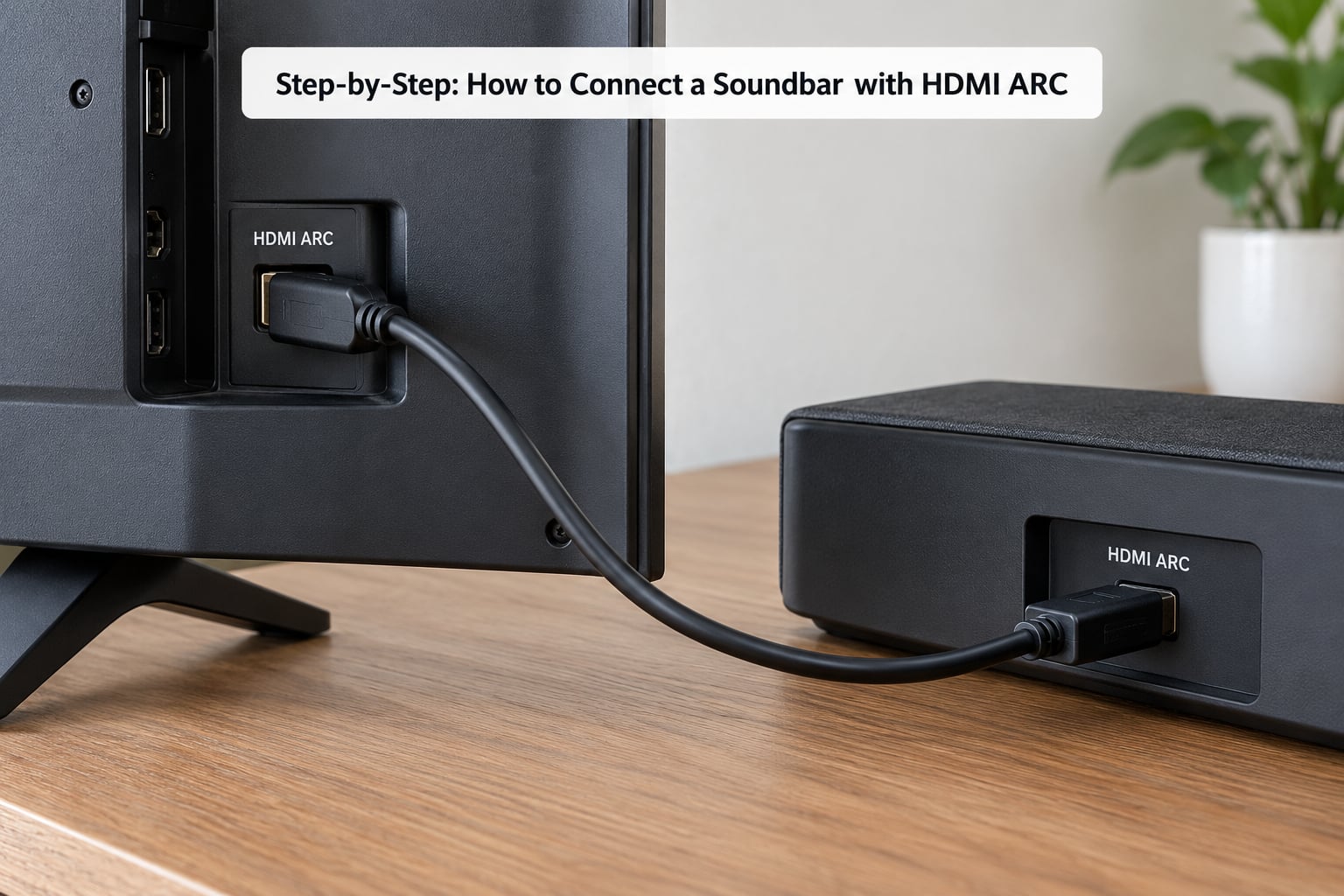
- 3. Connect the soundbar to the TV’s HDMI ARC port
- 4. Turn on the soundbar and select the HDMI input
- 5. Enable HDMI-CEC, ARC, or Control HDMI
- 6. Choose the soundbar as the TV’s audio output
- 7. Test the connection and adjust audio delay
- HDMI ARC vs eARC: What Actually Changes
- Common Mistakes
- If your TV has no ARC port
- Frequently Asked Questions
- Can I connect a soundbar to a TV using a regular HDMI cable?
- Do I need a special HDMI cable for HDMI ARC?
- What is the difference between HDMI ARC and HDMI eARC?
- Why does my soundbar work with video but not TV audio?
- Can I use an optical cable instead of HDMI ARC?
- Conclusion
What You Need
Three things, and you probably already own all of them.
- A television with an HDMI port labelled ARC or eARC. Check the label printed above or below the port, or look in the TV’s specification sheet. On many sets the same port also carries eARC, and it is often marked with a small headphone-with-arrows icon.
- A soundbar with an HDMI port labelled ARC, eARC, TV, or HDMI IN. Almost every soundbar sold in the last decade has one. Some older or very compact models only have optical, RCA or Bluetooth, so check before you buy a cable.
- A high-speed HDMI cable. Any certified High Speed HDMI cable works for plain ARC. You do not need HDMI 2.1 or a special “ARC cable” — that product does not exist.
You also want the two remotes, and roughly two minutes where you can switch the TV and the soundbar off and on again. If the set is wall-mounted, check that the ARC port is reachable before you start.
What the abbreviations actually mean
| Term | What it does |
|---|---|
| HDMI ARC | Audio Return Channel. Sends the TV’s own audio back down the same cable to the soundbar, so one cable carries picture and sound. |
| HDMI eARC | Enhanced Audio Return Channel. The same idea with far more bandwidth, so it can carry Dolby Atmos and DTS:X objects. |
| HDMI-CEC | Consumer Electronics Control. Lets the TV remote change the soundbar’s volume and power state. |
| Pass-through | The TV sends the raw audio bitstream to the soundbar instead of decoding it, which is what allows Atmos over HDMI. |
| Optical / TOSLINK | A separate digital audio cable. Works well but caps out at compressed 5.1. |
Step-by-Step: How to Connect a Soundbar with HDMI ARC
1. Check that your TV and soundbar support HDMI ARC
Both devices need it. A TV without an ARC port cannot send audio back, and the process stops there. The most reliable check is the specification page for your exact model rather than a guess based on the brand.
If the port does not say ARC, look for these clues instead: a label with the return-arrow symbol, a model that lists “HDMI eARC” in its specs, or a menu item called ARC, Simplink, Anynet+ or Control HDMI. Any of those mean the port is ARC-capable.
2. Turn off the television and soundbar
Power both down before you plug anything in. HDMI handshakes are negotiated the moment a cable carries a live signal, and plugging into a powered-on port is a common reason a handshake fails and needs a reset later.
Switch both off at the wall if you can. That also prevents a firmware update from being interrupted halfway through, which is a known cause of ARC dropping out later.
3. Connect the soundbar to the TV’s HDMI ARC port
Run one HDMI cable from the TV’s ARC or eARC port to the soundbar’s HDMI port. Direction does not matter on a soundbar — its ARC port is both an input and an output, which is exactly why one cable does the job.
Note which port number you used, for example HDMI 2 on the TV. On many sets only one port is ARC, and knowing the number makes the next step faster.
4. Turn on the soundbar and select the HDMI input
Power the soundbar first, then use its remote or the buttons on the unit to cycle inputs until the display reads HDMI, TV or ARC. Soundbars with a source label on the front are the easiest; the label often shows a tiny TV icon.
Here is the confusion that catches people: a soundbar with several HDMI sockets has one marked ARC or eARC and one or more marked HDMI IN. The cable from the TV goes in the one marked ARC. HDMI IN ports are for a console or streaming box feeding the soundbar, not for the TV.
5. Enable HDMI-CEC, ARC, or Control HDMI
This is the setting people miss. Without it, the soundbar plays sound but the TV remote does nothing and the TV keeps using its own speakers.
The feature has a different name on every brand, and it is usually switched on by default.
| Brand | Name of the feature |
|---|---|
| LG | Simplink |
| Samsung | Anynet+ (HDMI-CEC) |
| Sony | BRAVIA Sync |
| TCL (Google TV / Roku TV) | Control Other Devices (CEC) |
| Hisense, Kogan, Sky | CEC / Consumer Electronics Control |
| Philips, Xiaomi | HDMI-CEC / System Control |
| Roku TV | Automatic power off and 1-touch play |
On most sets you will find it under Settings, then Sound, Sound Output, External Device Setup or General Settings. Turn the toggle on, and leave “power off” or “auto standby” behaviours alone unless something is misbehaving.
6. Choose the soundbar as the TV’s audio output
ARC is an option, not a switch that grabs the audio. Most TVs keep playing through their own speakers until you say otherwise.
Open the audio output menu — Settings, Sound, Sound Output, or Speaker on most models — and select HDMI ARC, HDMI eARC, Optical, or the model name of the soundbar if the TV can see it over CEC. Where the setting exists, set TV Speaker to Off. That gives you a clear signal: if the TV speakers go quiet and the soundbar plays, the handshake is working.
Once CEC is on, the TV remote’s volume keys should control the soundbar. If they still move the TV volume, CEC is off or another device has taken it over.
7. Test the connection and adjust audio delay
Play anything from the TV’s own menu first, then switch to a streaming app. TV menus sometimes behave differently from app audio, and this tells you whether the problem is the ARC link or a specific app.
If dialogue sits slightly behind the picture, that is lip-sync delay, and it is a processing issue rather than a broken connection. Try three things: set lip-sync or audio delay to 0ms in the soundbar’s menu, turn off any TV sound processing such as dialogue enhancement, equaliser or sound optimisation, and if your TV has a game or movie mode, check that it is not adding delay. Soundbars that support it usually have an auto lip-sync adjustment, which is worth trying last.
HDMI ARC vs eARC: What Actually Changes
Plain ARC is not obsolete. It handles surround sound, Dolby Digital and most compressed formats. eARC adds the bandwidth for uncompressed audio and object-based sound.
| Feature | HDMI ARC | HDMI eARC |
|---|---|---|
| Audio format ceiling | Compressed 5.1, Dolby Digital Plus | Uncompressed 5.1 and 7.1, Dolby TrueHD, DTS-HD Master Audio |
| Dolby Atmos over HDMI | Only if the TV decodes it and re-sends it | Full Atmos and DTS:X objects |
| Cable | High Speed HDMI | High Speed HDMI with Ethernet channel, usually marked ARC |
| Typical requirement | TV and soundbar both support ARC | TV has HDMI 2.1 or later with eARC |
Do you need eARC for a soundbar? Only if you want Atmos or DTS:X from a disc player or console connected to the TV. If you are watching streaming services, most apps already deliver a compressed Atmos mix that ARC carries without trouble.
Mixing an eARC television with an ARC-only soundbar is fine. The link simply drops to ARC, and you keep picture, sound and remote control.
Common Mistakes
Nearly every failed ARC setup is one of a short list of things. Work through them in this order.
- You used the wrong HDMI port. This is the number one cause, and it is the one that produces no sound at all and no error message. Check the printed labels, then confirm in the TV’s input menu that the port you used reads ARC or eARC.
- You plugged into HDMI IN on the soundbar. That port is for a console or streaming device feeding the soundbar. The cable from the TV goes into the port marked ARC or eARC.
- CEC is switched off on the TV. Without Simplink, Anynet+ or BRAVIA Sync the audio can work while remote control and automatic switching do not. Look under Sound Output or External Device Setup.
- The TV is still set to TV Speaker. Set it to HDMI ARC or the soundbar name, and switch TV Speaker off so you can hear which one is active.
- Pass-through or bitstream audio is disabled. On some TVs the setting is called PCM or Bitstream and sits under Expert or Advanced audio options. Turn it on so Atmos streams reach the soundbar undecoded.
- The cable is damaged or not high speed. Cheap or pinched cables can pass video and fail the audio handshake. Try a certified High Speed cable before anything else, and note that the cable included with a TV is sometimes the older standard.
- Something else is occupying the handshake. Users on Samsung Q-series sets and on Sony amplifiers have reported ARC failing while a console sits in another HDMI port. Unplug the other HDMI devices and test with only the TV and soundbar connected.
- It stopped working after a power cut or a firmware update. The handshake needs clearing. Unplug both the TV and the soundbar from the wall for a full three minutes — not thirty seconds — then reconnect and power the TV first. Roku TV users have found this fixes ARC failures that a restart does not.
If your TV has no ARC port
Sets made before roughly 2010 often have no Audio Return Channel at all. Optical, also called TOSLINK or SPDIF, is the next best option: it carries 5.1 surround reliably, needs no CEC setting, and the TV’s optical out plugs straight into the soundbar’s optical in. The trade-off is compressed audio only, so no Atmos or DTS:X.
Bluetooth is the last resort for a soundbar. There is usually a second or more of delay, the connection can drop, and surround formats are not carried. Wi-Fi or Wi-Fi TV is cleaner when both devices support the same platform, and it handles Atmos on some sets — but it is a network feature, not a cable, and it needs setting up on a phone.
Frequently Asked Questions
Can I connect a soundbar to a TV using a regular HDMI cable?
Yes. ARC does not need a special cable, and there is no product sold as an ARC cable. Any certified High Speed HDMI cable does the job, including the one that came with your TV. If the connection is unstable, try a different High Speed cable before changing any settings, because a damaged or under-spec cable can pass video while failing the audio handshake.
Do I need a special HDMI cable for HDMI ARC?
No. Plain ARC runs over standard HDMI and needs no new cable. You only need more bandwidth when you want eARC with Dolby Atmos or uncompressed 5.1, and even then any High Speed HDMI cable marked with the ARC symbol will do. Higher-specification cables matter for 4K video at high refresh rates, not for the audio return path.
What is the difference between HDMI ARC and HDMI eARC?
Both send the TV’s audio back down the same HDMI cable, but eARC has far more bandwidth. ARC typically carries compressed 5.1 and Dolby Digital Plus, so Atmos usually depends on the TV decoding it first. eARC passes Dolby Atmos, DTS:X, Dolby TrueHD and DTS-HD Master Audio straight through, which is why it matters for disc players and consoles.
Why does my soundbar work with video but not TV audio?
Picture working but no sound almost always means the port is wrong or the TV is still set to TV Speaker. Confirm the cable runs from the TV’s ARC-labelled port to the soundbar’s ARC port, then set the TV audio output to HDMI ARC and switch TV Speaker off. Also enable CEC, since some sets need it before they will route audio at all.
Can I use an optical cable instead of HDMI ARC?
Yes, and on older TVs it is often the better choice. Optical, also called TOSLINK or SPDIF, carries surround sound reliably with no CEC setting to fiddle with. Its limit is bandwidth: it cannot carry Dolby Atmos, DTS:X or uncompressed audio. If your TV has no ARC port at all, optical is the standard fallback.
Conclusion
Start by looking at the labels rather than the port numbers. Find the port marked ARC or eARC on your television, run one high-speed HDMI cable to the soundbar’s ARC port with both devices switched off, turn on the CEC feature that your brand calls Simplink, Anynet+ or BRAVIA Sync, and set the TV’s audio output to HDMI ARC with TV Speaker off. If it stays silent, work through the mistakes above in order — wrong port first, then the soundbar input, then the CEC toggle.