An IMEI check is the five-minute step that tells you whether the phone in front of you is blocked, reported stolen, still tied to a payment plan, or locked to an account you do not own. You read the 15-digit IMEI off the handset itself, run it through a free carrier or blacklist lookup, and compare the result against what the seller claimed. That is the whole idea behind an IMEI check explained before buying a used phone.
It is also worth being honest about the limits. A clean result means the number has no block recorded today. It does not prove the seller is the original owner, and it cannot stop a financed device from being blacklisted weeks after you hand over money. Used phones are still a good deal in 2026 — you simply have to know which questions the check answers and which ones it cannot.
Last reviewed in 2026. Checkers, carrier tools and menu paths change often, so read this as the current state of the process rather than a permanent rulebook.
Table of Contents
- What Is an IMEI and What Does an IMEI Check Prove?
- How to Find and Read a Used Phone IMEI
- On an Android phone
- On an iPhone
- Using the dial code
- Reading it properly
- Dual SIM and eSIM
- What an IMEI Blacklist Check Can and Cannot Tell You
- IMEI Check Explained Before Buying a Used Phone
- Ask for the IMEI before you travel, then ignore the photo
- Read the number twice, from two locations
- Compare with the box or the purchase record
- Run two independent lookups
- Confirm the device is free of carrier restrictions
- Keep proof of the transaction
- Why an IMEI check explained before buying a used phone beats a screenshot
- What to do when a seller refuses the check
- Never alter an IMEI
- How to Check an IMEI on Android and iPhone
- Other Used-Phone Checks That Matter After the IMEI Check
- Frequently Asked Questions
- Is a free IMEI check accurate?
- Does an IMEI identify the owner of a phone?
- Why can a clean IMEI result still be risky?
- What should I check before buying a second-hand phone?
- What should I do if the IMEI comes back blocked or suspicious?
- Conclusion: Make the IMEI Check Part of a Safer Purchase
What Is an IMEI and What Does an IMEI Check Prove?
An IMEI — International Mobile Equipment Identity — is a unique 15-digit number permanently assigned to a mobile phone at the factory. Networks use it to identify a device on the air, and police and carriers use it to block handsets reported lost or stolen. An IMEI check reads that number and looks it up against block lists, lost-and-stolen databases and manufacturer records.
The number itself has structure. The first 8 digits are the Type Allocation Code, which identifies the manufacturer and model. The next 6 are the serial number. The final digit is a check digit computed from the others, which is why some tools will tell you straight away that a number has been typed in wrong.
Here is the distinction that gets lost in most explainers. The IMEI identifies a phone. It does not identify a person. There is no public database that maps an IMEI to a name, an address or an account, and a checker that claims to do so is either drawing a bad inference or selling you something.
Two similar numbers cause regular confusion. The serial number tracks the unit for warranty and repair purposes, and it does not sit on any block list. The IMEI2 is a second identifier used in some networks, and phones with dual SIM slots or an eSIM can show more than one IMEI on the About screen. Both of those are legitimate reasons for two numbers. A mismatch between the dial code and Settings is not.
So an IMEI check proves what the number is currently flagged for. It cannot prove who owns the phone, whether the original purchase was legitimate, or whether the seller will still owe money on it tomorrow.
How to Find and Read a Used Phone IMEI
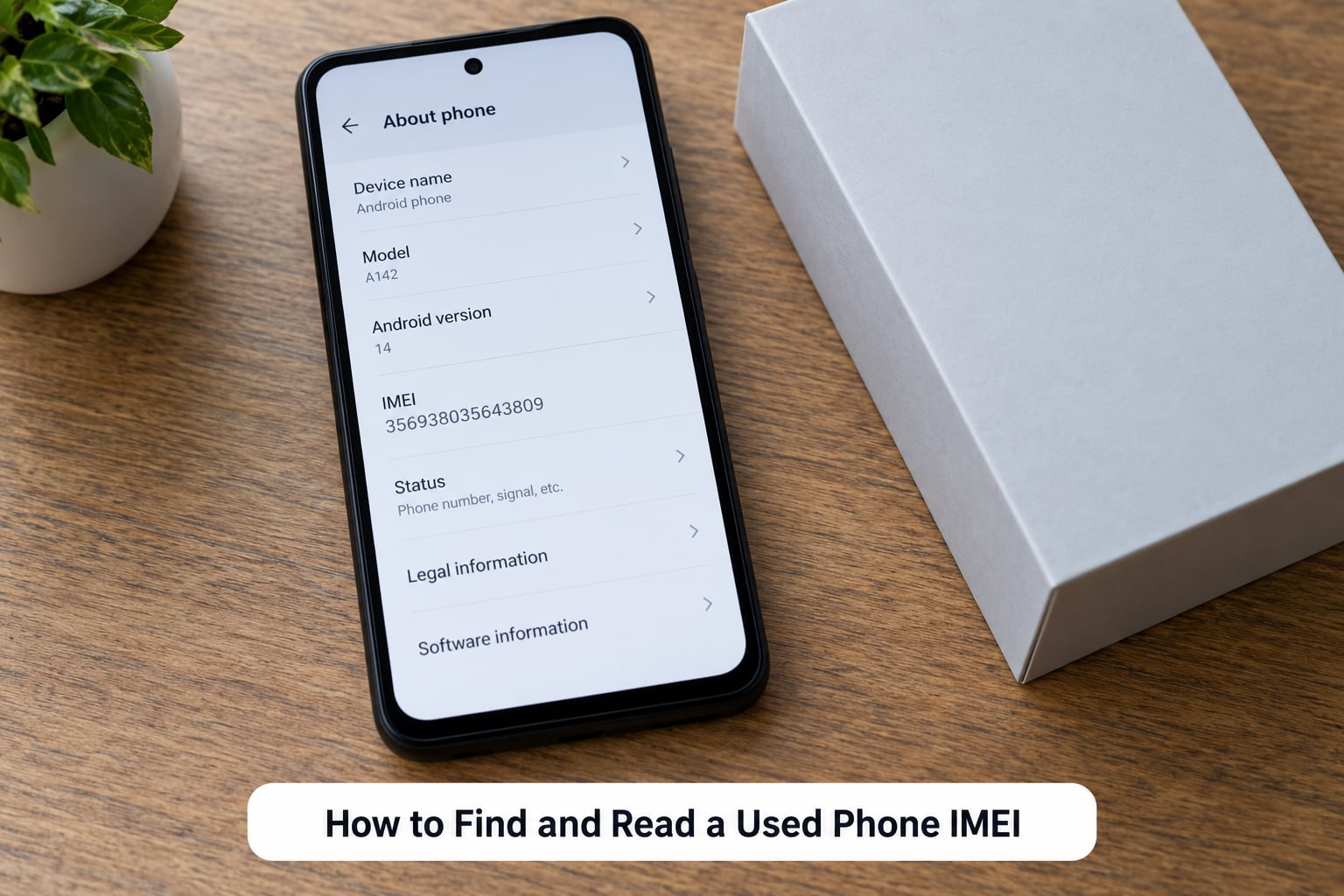
Every phone gives the number up in more than one place, and reading two of them is how you catch a swapped sticker or a mismatched box.
On an Android phone
Open Settings, tap About phone, then Status information or IMEI information depending on the version. The label is worded differently on Samsung, Xiaomi, Google Pixel and others, but it is always somewhere in the About phone section. Some models hide it one level deeper behind Phone information.
On an iPhone
Open Settings, tap General, then About, and scroll to IMEI. The 15 digits sit a few lines below the model name. iPhones also print the IMEI on the back of the phone on some models and on the SIM tray or packaging on others, which gives you something physical to compare against.
Using the dial code
Open the phone app and enter *#06#. The IMEI appears immediately, and on many handsets tapping the number copies it to the clipboard. Some Android models show the number there but refuse the tap-to-copy, which is why the Settings route stays useful as a backup.
Reading it properly
Count all 15 digits and compare them digit by digit, not at a glance. Look for the 8-digit type code at the start and confirm the model it implies matches the phone you are holding. If the number on the box, the number behind the battery or on the tray, and the number in Settings are not identical, stop and ask why before anything else.
Dual SIM and eSIM
Phones with two physical SIM slots show two IMEIs, and a phone with a SIM plus an eSIM may show two as well. Compare each against the matching printed number rather than treating a second entry as a scam signal on its own.
What an IMEI Blacklist Check Can and Cannot Tell You
Free lookups fall into a small number of outcome types, and each one points somewhere different.
| Result | What it means | What to do |
|---|---|---|
| Clean | No block recorded against the number on the databases the tool covers | Continue with the account, carrier and physical checks |
| Carrier locked | The phone is tied to one carrier and will not take another SIM until it is released | Ask the seller to remove the carrier lock before paying, with the account holder present |
| Financed balance | An instalment plan is still open and the carrier can block the device at any time | Walk away, or have the balance settled and confirmed in writing first |
| Reported lost or stolen | The number sits on a lost-and-stolen register | Do not buy. No network will reliably activate it |
| Unknown or not found | The number is not in that particular database | Treat it as unverified and run a second, independent lookup |
Now the part most guides skip. Four separate systems get mashed together under the word blacklist, and they behave differently.
A carrier block list stops the phone from registering on that network. A lost-and-stolen register is the police and industry reporting system, and a hit there follows the device regardless of carrier. A SIM or carrier lock is the manufacturer’s activation lock tied to one carrier. An Activation Lock on iPhone, or a Google account lock on Android, is an account-level lock that no IMEI lookup will ever show, because the block lives in the cloud account, not the handset.
There are real limits to the databases too. Coverage varies by country and carrier, so a number can look clean on a free site and flagged on a carrier-owned checker. Old devices from before the reporting systems matured have thin records. And a financing block can be added after your check runs, which is the specific fear that comes up again and again in r/tmobile and r/Flipping threads about instalment plans.
Free checkers also disagree with one another, and many show a partial result behind an upsell. That is normal. Read the result as one signal, not a verdict.
IMEI Check Explained Before Buying a Used Phone
Here is the order that works. It takes about ten minutes in person, longer over a message thread.
Ask for the IMEI before you travel, then ignore the photo
Sellers routinely send a photo of the About screen. A photo proves nothing — the phone in the box can be a different handset from the one with the number in the picture. Use the photo to start the conversation, not to finish it. The number only counts when you read it off the physical device in front of you.
Read the number twice, from two locations
Dial *#06#, note all 15 digits, then open Settings and confirm they match. On iPhone, cross-check against the number on the tray or the box. A phone whose Settings IMEI and dial-code IMEI disagree has been tampered with, and you should walk away rather than diagnose it.
Compare with the box or the purchase record
If you have the box, the shipping label or the original invoice, match the printed number. A mismatch means the label was replaced or the box belongs to another unit, and you want an explanation before you hand over payment.
Run two independent lookups
Use the carrier you intend to use — most major carriers publish a free IMEI eligibility or compatibility checker on their own site — and then run a separate general lookup for lost-and-stolen records. Where you have the option, get the check done by staff at a carrier store. People in r/tmobile rate that in-person check as the most authoritative free method available, because carrier staff query internal systems a public site cannot reach.
Confirm the device is free of carrier restrictions
A clean block check does not mean the phone accepts every network. Ask the seller to remove the carrier restriction with their account login, or confirm in writing that it was never carrier-locked. If the phone was bought overseas, region bands and network support can restrict it even when the number is clean.
Keep proof of the transaction
Pay with a method that has buyer protection rather than a bank transfer, and keep the listing, the seller’s confirmation and a photo of the IMEI screen showing today’s date. If something goes wrong a week later, that evidence is the difference between a refund request and no argument at all.
Why an IMEI check explained before buying a used phone beats a screenshot
Because the number can be written, swapped or altered, and only a number read off the hardware in front of you connects the lookup result to the phone you are actually buying.
What to do when a seller refuses the check
Refusal is the answer. Someone who will not dial a code, will not show the tray, or gets visibly uncomfortable when you mention payment protection is telling you what you need to know. There is no legitimate reason to withhold this from a serious buyer, and the few who do are usually carrying a financed or stolen device.
Never alter an IMEI
Changing or “repairing” an IMEI to slip past a block is illegal in most countries, it is permanently flagged once it happens, and services advertising it are operating as a fraud business. If a seller offers it to you, that ends the conversation.
How to Check an IMEI on Android and iPhone
| Method | Android | iPhone | Notes |
|---|---|---|---|
| Settings path | Settings > About phone > Status or IMEI information | Settings > General > About > IMEI | Wording varies by manufacturer and Android version |
| Dial code *#06# | Supported on most models | Supported on most models | Tap-to-copy works on some devices only |
| Physical label | Back of phone, SIM tray or box | Back of phone, SIM tray or box | Can be swapped — verify against Settings |
| Multiple IMEIs | Common on dual-SIM models and eSIM | Common on dual-SIM and eSIM models | Compare each printed number separately |
The Android side is the messier one. Samsung, Xiaomi, Pixel and Motorola all bury the number in the About phone section but label it differently, and on some Chinese-market models with dual SIM slots you get two IMEIs listed one under the other. If the path is not where you expect, search Settings for IMEI rather than digging blindly through menus.
iPhone is tidier: one path, one number, the same location every time. The complication on iPhone is that Activation Lock is invisible to any IMEI lookup. Ask the seller to remove it from Find My iPhone in front of you, and confirm the phone reaches the Hello screen after a reset.
On both platforms, check the physical handset rather than trusting a screenshot. That is the entire difference between a real IMEI check and a decorative one.
Other Used-Phone Checks That Matter After the IMEI Check
A clean number tells you the phone is allowed on a network. It says nothing about the condition of the phone in your hand. Work through these before paying.
- Activation and account locks. On iPhone, sign out of iCloud and turn off Find My iPhone in front of the seller. On Android, remove the Google account and confirm no work profile or device administrator is active. Pass signal is a setup screen with no previous account attached; fail signal is any prompt for a password you have never seen.
- Corporate or MDM lock. Business phones carry an enrolment profile that survives a factory reset. If Settings shows an unknown management profile, the phone is not yours.
- Battery health. On iPhone, Settings > Battery > Battery Health gives a maximum capacity percentage and a cycle count. Anything under roughly 80 percent on an older phone usually means a replacement, and worth pricing in. Android models vary widely; some show cycle counts in the battery section, some need a diagnostic app.
- Display. Open a full-screen white and black image and look for dead pixels, banding, uneven brightness or a tint at the edges. Drag an app across the screen to check for ghosting.
- Charging port and cable. Wiggle the connector gently while charging. A phone that only charges at one angle has a worn port, and the repair is rarely cheap on newer models.
- Cameras. Shoot a photo and a short video in each lens, then check for haze in the lens, a shaky stabiliser or a microphone that drops out. A foggy front lens that never clears is a water-damage symptom.
- Liquid contact indicators. Small strips inside the SIM tray or under the battery change colour or turn red after moisture. Some iPhones show it in the tray itself.
- Microphone, speakers and buttons. Record a voice memo, play audio through the speaker and through a pair of wired headphones, and press every button including the volume rocker and fingerprint sensor.
- Storage and factory reset. Confirm the reported storage matches the advertised capacity, then do a full reset and watch it complete. A phone that will not reset cleanly is telling you something.
Two questions worth asking directly and skipping politely if the answers are vague: has the screen ever been replaced, and is the device still under a payment plan. Howardforums threads are full of people who bought phones with an active plan, which is exactly the category of trouble the IMEI check is supposed to catch before money changes hands.
Frequently Asked Questions
Is a free IMEI check accurate?
A free check is accurate for what its databases cover, which is usually lost-and-stolen records and basic model information. It often stops short of carrier financing balances, regional lock status and account locks. Carrier-owned checkers and an in-person check at a carrier store cover more. Run two independent lookups rather than trusting one, and treat a clean free result as one signal among several.
Does an IMEI identify the owner of a phone?
No. An IMEI identifies a handset, not a person, and no legitimate public service maps a 15-digit IMEI to a name, address or account number. Ownership has to be established another way: proof of purchase, the original account holder present to remove the lock, or a carrier confirming the device is free of balances. Any site claiming to identify the owner from an IMEI is either guessing or selling something.
Why can a clean IMEI result still be risky?
Because the block may not exist yet. A phone bought on an instalment plan can be clean on the day you check and blocked by the carrier weeks later when the previous owner stops paying. Coverage also varies by country and carrier, and account-level locks such as iCloud Activation Lock or a Google account lock never appear in an IMEI lookup at all. A clean result is a good sign, never a guarantee.
What should I check before buying a second-hand phone?
Read the IMEI off the handset with *#06# and confirm it matches Settings, then run a carrier check and a separate lost-and-stolen lookup. After that, confirm the phone is free of carrier restrictions and account locks, check battery health and cycle count, test the display, cameras, charging port, microphones and speakers, look for liquid contact indicators, and verify the storage matches the advertised specification.
What should I do if the IMEI comes back blocked or suspicious?
Do not pay, and do not accept a promise to sort it out later. A blacklisted or stolen-reported number means no network will reliably activate the phone, and sellers who say it will clear up are usually describing a payment plan they have not finished. If you already bought the phone, contact your carrier immediately with proof of purchase and ask what they can do. Never accept an offer to alter or repair the IMEI, which is illegal in most countries.
Conclusion: Make the IMEI Check Part of a Safer Purchase
Do one thing first: pick up the phone, dial *#06#, and read the number off the screen in front of you. Match it against Settings, then against the box or the invoice if you have either. Run a carrier check and a separate lookup, and only then look at battery, locks and the rest of the hardware.
That sequence takes ten minutes and closes off most of the ways used-phone deals go wrong — mismatched numbers, stolen devices, unfinished payment plans and phones locked to someone else’s account. If a seller objects to any step in it, that is your answer, and it arrives before you have paid anything.